When I was building bookmaru, I hit a familiar snag: I needed a contact form that would actually notify me when someone reached out. Sure, I could've spun up a database, configured email servers, or subscribed to yet another SaaS tool. But all of that felt like overkill for what should be a simple feature. What I was building was a simple side-project after all (that I expected to have very low traffic), not a full-blown enterprise app.
Then I remembered ntfy — a lightweight, open-source notification service that I'd come across before.
So, I decided to give it a try. Here's how I set it up.
A small introduction to ntfy
Ntfy is a simple yet powerful notification service that allows you to send push notifications to your devices via a simple HTTP API. You can self-host it or use the public instance at ntfy.sh. It supports various notification channels, including mobile push notifications and desktop notifications.
You can check out the official documentation here for more details.
Setting up ntfy for contact form notifications
First, download the ntfy app on your mobile device or desktop from here. Once installed, create a new topic for your contact form notifications. For example, you might name it contact-form-notifications.
About topics:
Topics are public, so you need to choose a unique name to avoid conflicts with other users. You can also set up authentication if you want to keep your notifications private.
Next, you'll need to configure your contact form to send notifications to ntfy. I'm using SvelteKit for my project, but the concept applies to any backend technology.
/**
 * Server-only utility functions for sending notifications via ntfy.sh
 */
import { PRIVATE_VITE_NTFY_TOPIC, PRIVATE_VITE_NTFY_TOPIC_CONTACT } from '$env/static/private';

export interface NtfyNotification {
	title: string;
	message: string;
	priority?: 'min' | 'low' | 'default' | 'high' | 'max';
	tags?: string[];
	click?: string;
	attach?: string;
	icon?: string;
}

export async function sendNtfyNotification(
	topic: string,
	notification: NtfyNotification
): Promise<boolean> {
	try {
		const url = `https://ntfy.sh/${topic}`;

		const headers: Record<string, string> = {
			'Title': notification.title
		};

		if (notification.priority) headers['Priority'] = notification.priority;
		if (notification.tags) headers['Tags'] = notification.tags.join(',');
		if (notification.click) headers['Click'] = notification.click;
		if (notification.attach) headers['Attach'] = notification.attach;

		const response = await fetch(url, {
			method: 'POST',
			headers,
			: notification.
		});

		 response.;
	}  (error) {
		.(, error);
		 ;
	}
}

   (): <boolean> {
	 topic = ;

	 messageParts = [
		contactData. ?  : ,
		,
		,
		contactData.
	];

	 :  = {
		: ,
		: messageParts.(),
		: ,
		: [, , ]
	};

	  (topic, notification);
}
I created a utility function sendNtfyNotification that takes care of sending notifications to the specified ntfy topic. The sendContactNotification function formats the contact form data and calls the notification function.
Also, I made sure to store my ntfy topic in environment variables for security. As this is a server-only operation, I used SvelteKit's PRIVATE_ prefix to keep these variables out of the client bundle.
Handling form submissions
Now, in my SvelteKit endpoint that handles the contact form submissions, I simply call the sendContactNotification function:
import type { RequestHandler } from '@sveltejs/kit';
import { sendContactNotification } from '$lib/server/ntfy';
import { z } from 'zod';
const contactFormSchema = z.object({
    email: z.string().email().optional(),
    message: z.string().min(1)
});
export const POST: RequestHandler = async ({ request }) => {
    try {
        const formData = await request.json();
        const parsedData = contactFormSchema.parse(formData);

        const notificationSent = await sendContactNotification(parsedData);

        if (notificationSent) {
            return new Response(JSON.stringify({ success: true }), { status: 200 });
        } else {
            return new Response(JSON.stringify({ success: false, error: 'Failed to send notification' }), { status: 500 });
        }
    }  (error) {
          (.({ : , : error. }), { :  });
    }
};
With this setup, whenever someone submits the contact form, I receive a push notification on my device via ntfy. It's simple, efficient, and requires minimal setup.
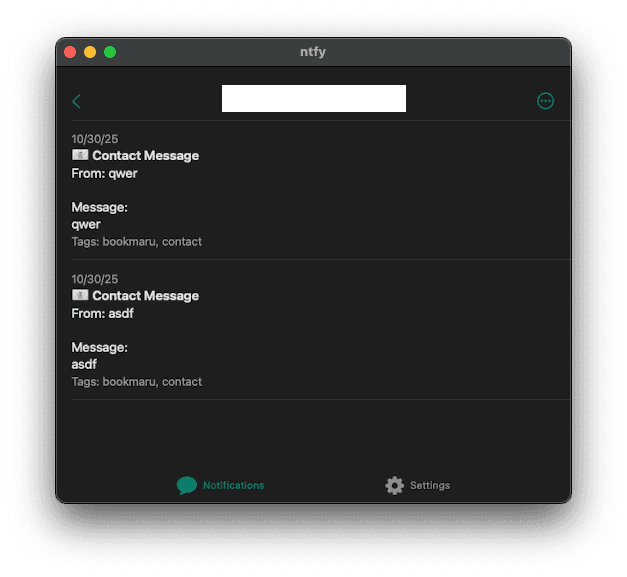
And that's it! With just a few lines of code and the power of ntfy, I was able to implement a notification system for my contact form without the hassle of managing a full backend infrastructure.